
This procedure describes how to connect in RDP / RemoteApp from a Linux client machine, using the TSplus Load-Balancing feature and FreeRDP.
Prerequisites:
Configure the Reverse Proxy & enable Load-Balancing so all your servers can be reached from outside using https://GatewayAddress/~~APP-SERVER-NAME
The Reverse Proxy documentation is available at this location: https://docs.terminalserviceplus.com/tsplus/using-the-reverse-proxy-feature
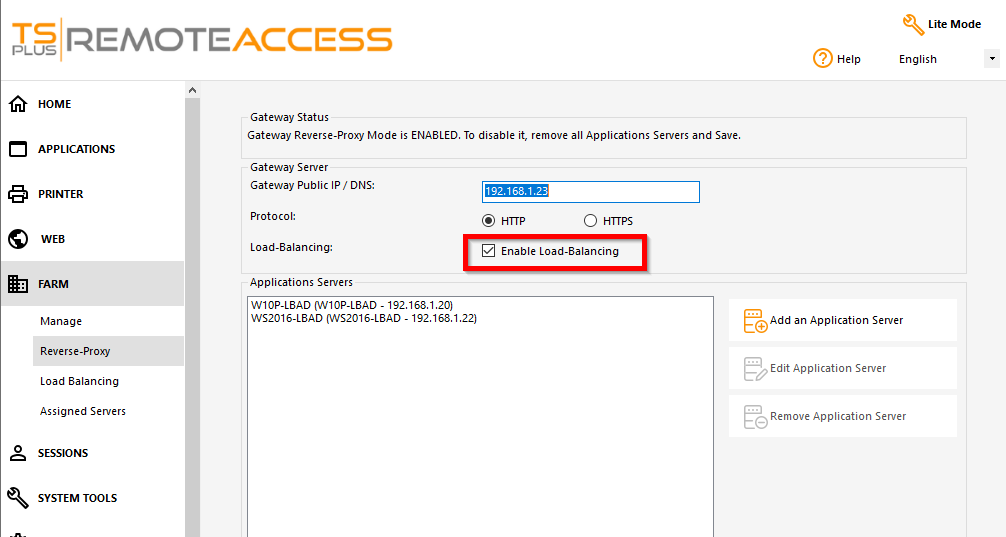
Configure the connection as follows:
The RDP / RemoteApp .rdp template needs to be placed on the Linux client machine
The .sh script will be used on the Linux machine to:
Copy the template to the user’s profile folder -> CLIENT.rdp
Interrogate the Gateway to get the less loaded application server name by calling this URL: https://GatewayAddress/cgi-bin/hb.exe?action=lb
Add a new line to CLIENT.rdp (the target application server’s details) using the less loaded application server’s name -> /~~APP-SERVER-NAME
The first part of this procedure is the .rdp template. You can use the RDP-TEMPLATE or RemoteApp-TEMPLATE attached to this documentation depending on your needs.
If you edit the .rdp template with Notepad, you will see its configuration:
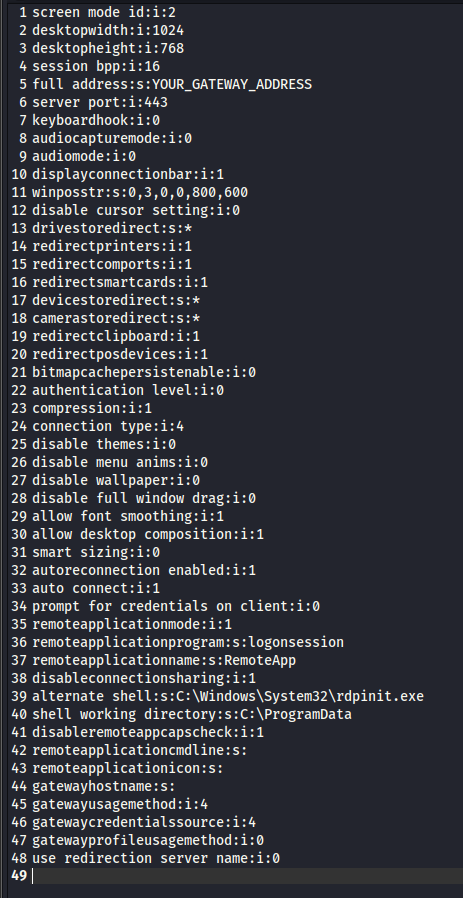
Edit Line 5