
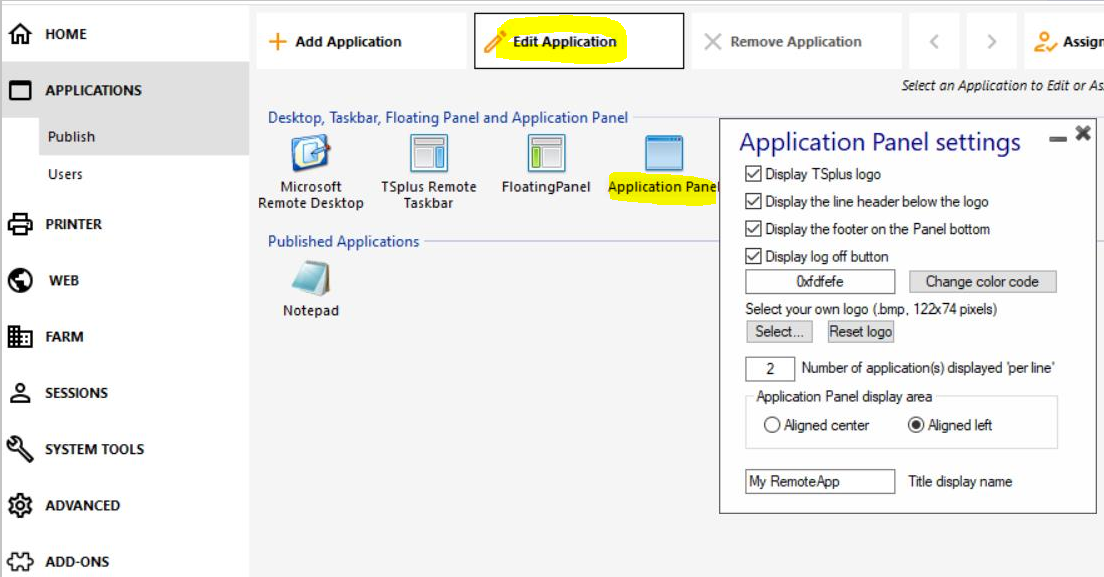
How to change the settings of the Application Panel?

Categoria: Advanced Configuration & Troubleshooting | Visualizações: 571Criado: 2021-03-29 | Atualizado: 2022-03-10Open the AdminTool and go to the Applications tab.Then proceed as shown here:You can also manually edit theApplicationPanel.inifile.It is located here:C:\Program Files...

Atualizado em 22/10/2026 1 min de leitura Remote Access
Remote Access 200 tópicos
Ver a categoria

Categoria: Advanced Configuration & Troubleshooting | Visualizações: 571

Criado: 2021-03-29 | Atualizado: 2022-03-10

Open the AdminTool and go to the Applications tab.


Then proceed as shown here:

You can also manually edit the ApplicationPanel.ini file.


It is located here: C:\Program Files (x86)\TSplus\UserDesktop\ApplicationPanel.ini


It contains multiple values, all in the [ApplicationPanel] section:


bkgcolor = 0xfdfefe

header = yes

logo = yes

footer = yes

displayarea = center

logoffbutton = yes

nbrofcolumn = 5

displaytitle = Applications
