
In this complex case you have:
Load Balancing enabled
Reverse proxy
Web credentials
Application Portal
Create the following web credentials :
For TSP_user1 : webusername = test1 and webpassword = Test1Letme1n21
For TSP_user2 : webusername = test2 and webpassword = Test2Letme1n21
Since your users are local, and in order to perform the test on the gateway server (which also acts as an application server), assign SRV-TSPLUS-1 server to both users from the AdminTool\FARM\Assigned Servers
Since you have the Application Portal enabled, this also requires your users to be able to open multiple session, setting that you will enable from the AdminTool\SESSIONS\Settings\Session Management Settings
Z drive is not mapped from tspadmin session, so have it mapped it manually using the provided path & credentials, and created the following files :
Z:\user-1\TestUser1.txt
Z:\user-2\TestUser2.txt
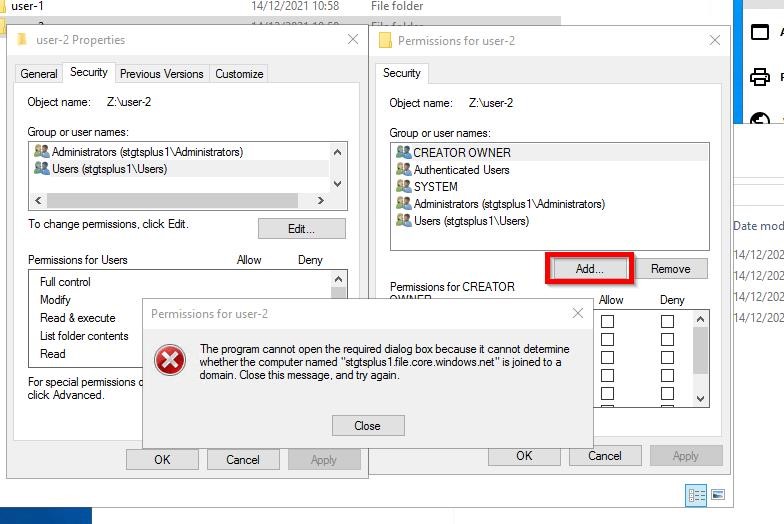
Some permissions issues can appear when trying to give permissions to user-1 and user-2 folders, probably related to the fact that these users are local from SRV-TSPLUS-1 and the folder’s properties indicate stgtsplus from the permissions tab :
So create the following logon scripts and place them on the related user’s Roaming folder :